 RingToPaid
Say the job. Send the invoice.
Talk through the job in your own words. Speak-to-Invoice, our estimate and invoice app for contractors, builds the estimate or invoice from your price list and flags anything it isn't sure about, like a missing house number or a price that doesn't match your rates. Add your own payment link and every invoice gets a Pay now button and QR code.
"Estimate for Linda Moreno, 14 Cedar Lane in Millbrook. Two small drywall patches in the hallway, one medium patch behind the bedroom door, and paint the hallway. Thirty percent deposit."
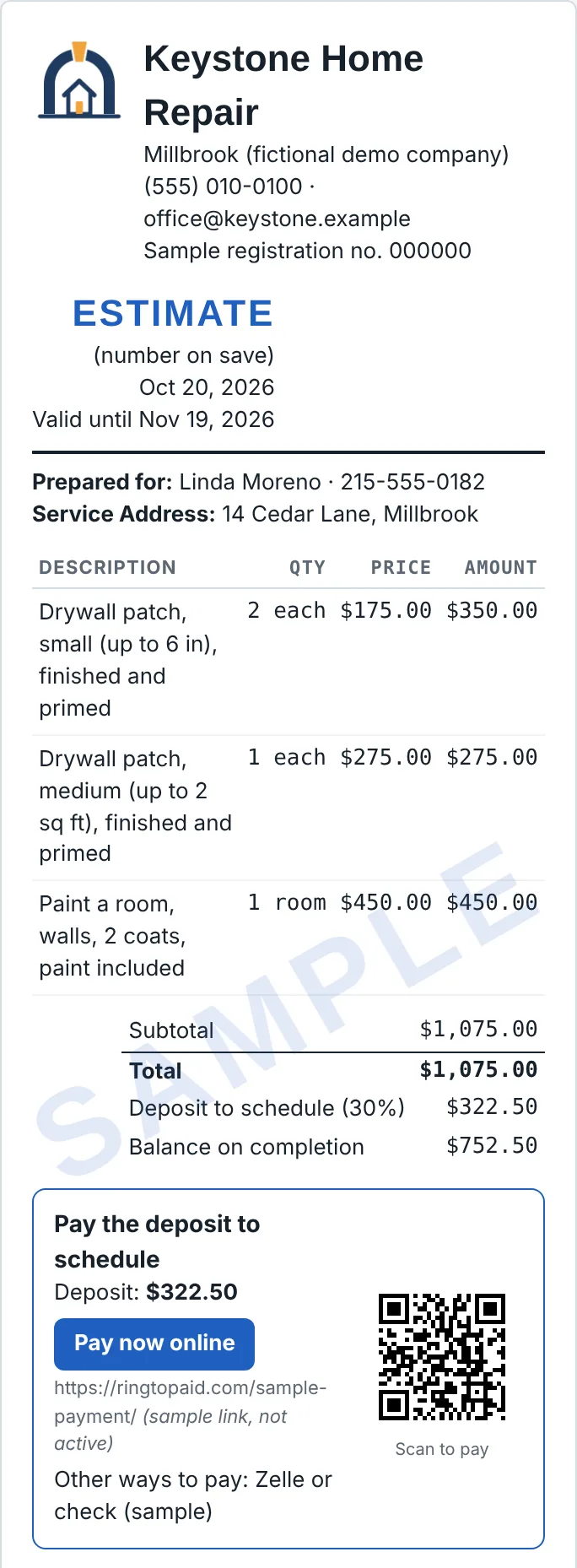
A clean estimate with your logo, line items priced from your rate card, totals and deposit, ready to send as a PDF. With your payment link added, it shows a Pay now button and QR code for the deposit. Turn it into an invoice with one tap when the job's done.
Real screenshot from the free demo, with a made-up company.
Where it stands today
- Free demo, available now: try it with a sample company and rate card. Nothing you say or type is saved, and samples are watermarked.
- Paid app, in early access: your own account, logo, rate card and saved estimates and invoices, on your phone or computer. We're opening it to a small group first.
- Planned price: $29 a month, or included with an AI Receptionist plan.
Joining the list doesn't commit you to anything. We'll email you when your spot opens.
Questions
Are my estimates and invoices saved? Can I use them at tax time?
In the paid app, yes. It saves every estimate and invoice in your account. (The free demo saves nothing.) You can download any of them as a PDF, see totals invoiced and paid by month, quarter or year, and export everything to a spreadsheet for your bookkeeper or accountant. It keeps your records; it doesn't give tax advice.
Can I see won estimates or unpaid invoices separately?
Yes. Filter your documents list to see estimates that are sent, not sent, won or not won, and invoices that are not sent, sent but unpaid, or paid.
Can my customers pay from the estimate or invoice?
Yes. Add your own payment link (from Stripe, Square or PayPal, for example) and any other ways you take payment, like Zelle or check, on the Your Company tab. Invoices then show a Pay now link and a QR code for the balance, and estimates with a deposit show one for the deposit. The link also goes in the text message you send. The money goes straight from your customer to you; RingToPaid never handles it, and your payment provider's normal fees apply.
Can I add my own logo?
Yes. Upload your logo (PNG or JPG) and choose where it sits on your estimates and invoices: on the left, centered above your business name, or centered beside it.
If I change my rates or services, do my old estimates and invoices change?
No. Rate card changes apply only to new estimates and invoices. Everything you've already made keeps the prices it had.